To find out how full your car is, you have to go and sit in it.
Unlock it, get in, push Start, wait for the dash. Every single time. LeafCharge shows you instead — from the sofa, from the shops, from wherever you are — and tells whoever else drives it too. Then, if your charger can delay, it works backwards from when you actually leave so the car is ready without spending the night sitting full.
Free · installs to a home screen · works offline · an account only if you want it on more than one phone
Why it exists
The Nissan Leaf will not tell you much. Plugged in in the garage it shows three lights, which is thirds, and only if you walk out and look through the windscreen. To find out how full the battery actually is you have to unlock the car, get in, push Start, and read the dash. Every single time.
Charging fast is a choice, and it is usually the wrong one. Lithium cells dislike heat and fast charging makes heat, and over a few thousand cycles that difference shows up as capacity loss. Fifteen amps over eight hours puts the same energy into the pack as forty amps over three, with less wear on it. If the car is going to sit there all night anyway, there is nothing to be gained by hurrying.
Finishing early is its own cost. A pack held at 100% ages faster than one held at 60, so an overnight charge that completes at one in the morning spends six hours doing damage for no benefit. The fix for both is the same: go slower, and arrive later.
Knowing where it is, without going out to it
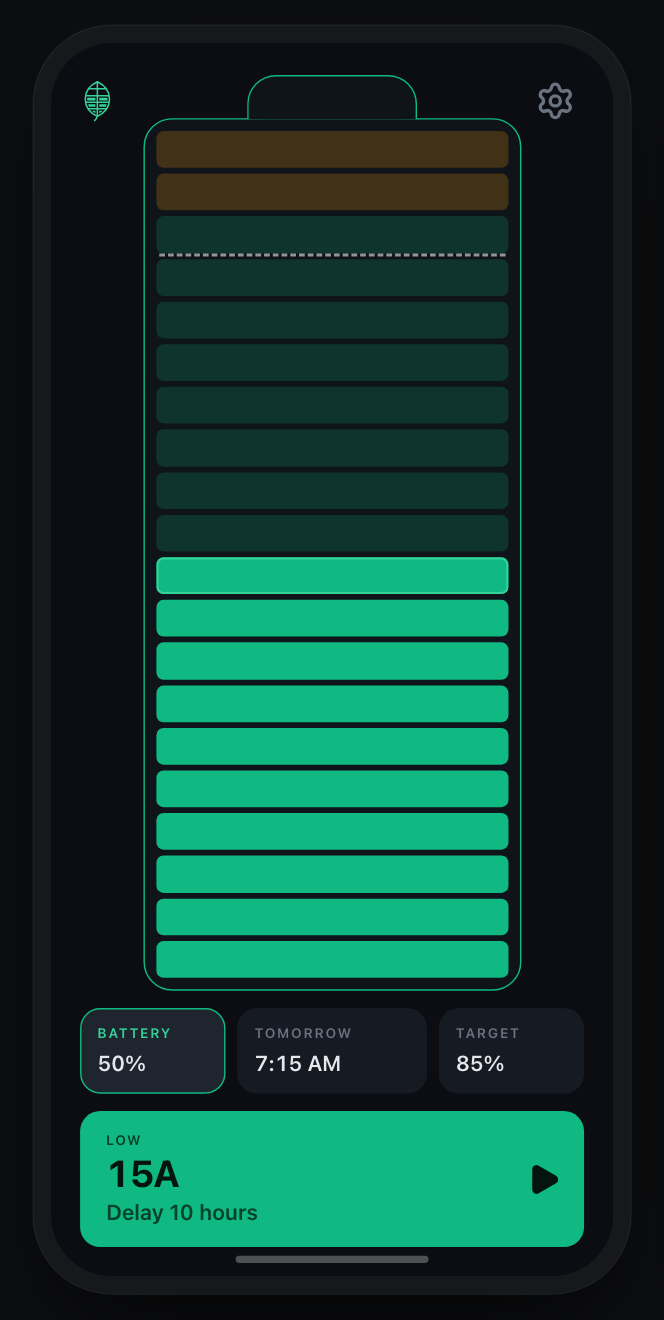
Once a charge is running, LeafCharge fills the battery on screen at the rate it planned, with the block at the top pulsing to show it is moving. Twenty blocks rather than three lights, and from the sofa rather than from the driveway. Plugged in at a shopping centre, two floors up, it says when the car reaches your target, so you know whether to keep browsing or go back down.
It is an estimate, not a reading. Nothing here talks to the car, because an older Leaf has nothing to talk to. It projects forward from the last figure you gave it at the rate you are charging, and every time you correct it on the way out, it gets closer.
Sign in and invite the other people who drive the car. They see the same cars and the same charge, and can start or stop one themselves. Nothing is shared until you ask for it. Signed out, everything stays on the phone it was typed into.
It can also tell you, so you do not have to check. A charge takes hours, and nobody wants to open an app every half hour to watch a number climb. So it sends one notification when somebody plugs in, with the time they set it for, and one when the car reaches what you asked for, with the time it would be full if it stays plugged in. Two for a whole charge.
Working backwards from when you leave
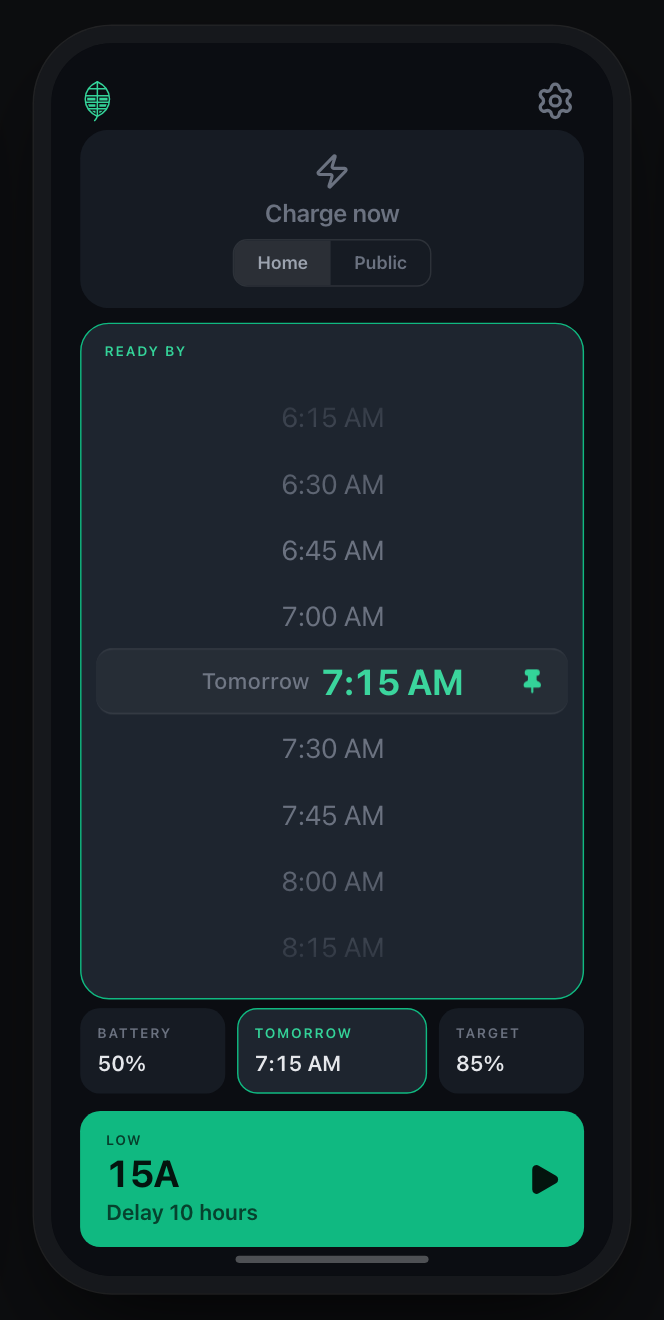
You give it two things: where the battery is now, and when you need the car. It knows the rest — your pack size, its state of health, and what each rate on your charger really delivers. From there the arithmetic runs the other way round to how a charger thinks:
battery      50%          you have 19 hours before you leave
target       85%          you need 35% of a 40 kWh pack
15A          7.9 %/hr     which takes 4h 25m
             →            so wait 14h 35m, then start
Most home chargers can be told to wait some number of hours before it starts, and every one of them makes you work out that number yourself. This is the number. It picks the slowest rate that still fits the window.
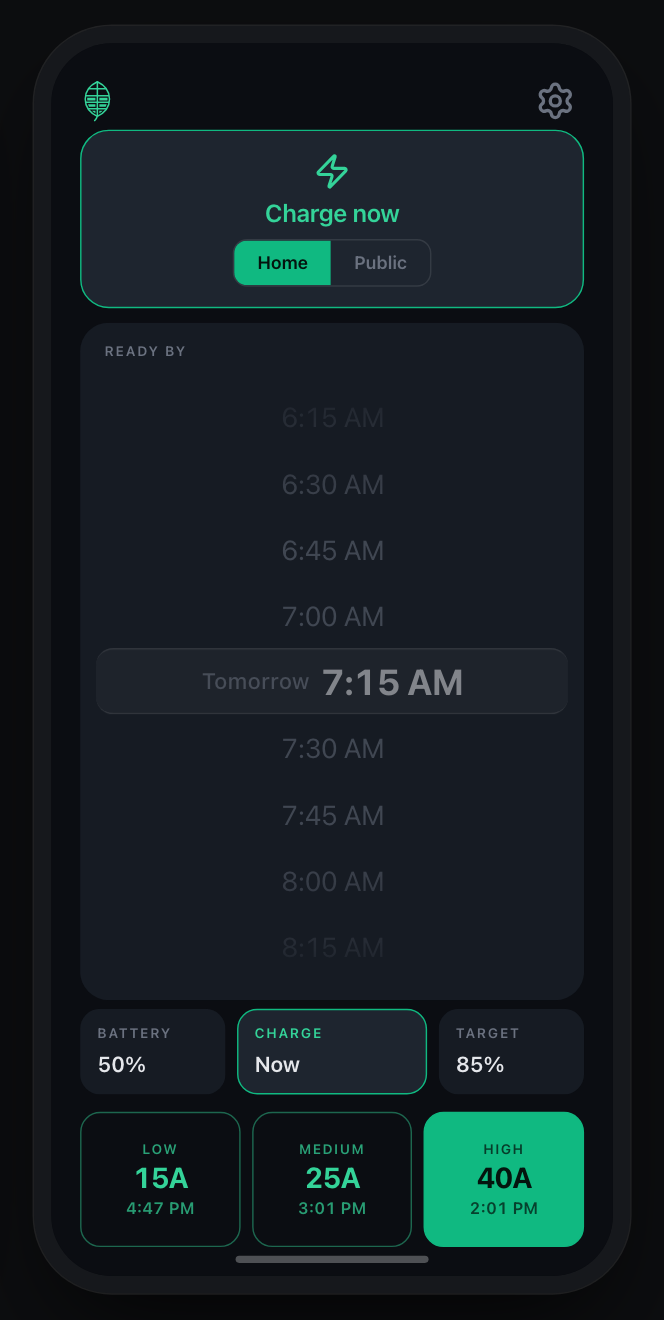
When there is no deadline — a public charger, or an unplanned top-up — it runs the other direction and tells you when each rate would get you there, so you pick by how long you are willing to wait.
Reading the bar
Solid green is the charge you have. Faded green is the charge the plan will add. A dashed line marks your target, and anything past it turns amber. It is drawn in blocks of five percent because that is the resolution the estimate deserves.
It learns your charger
The amps on a charger’s dial are not the amps that reach the pack. Some is lost as heat, some to the onboard charger’s own efficiency, and the gap differs at every rate. So each rate keeps its own figure. Correct the percentage when you stop a session, and it compares that against what it predicted and adjusts that rate alone.
After a handful of charges the numbers describe your charger and your car rather than the label on the box — which is what makes “this will take four hours twenty-five” worth believing.
Under it
- Built with
- Svelte, TypeScript and Vite
- Offline
- Installs to a home screen as a progressive web app and runs with no network at all, which matters in a garage with one bar.
- Calibration
- Each rate learns separately. Correct the percentage when you stop a session and the next estimate is closer — the app converges on what your charger really does rather than what its label claims.
- Cars
- More than one, if you have more than one. Each keeps its own battery, charger, calibration and departure times, and the switcher only appears once there is a second one to switch to.
- Storage
- Signed out there is no account and nothing on a server: settings, sessions and history live in your browser and go nowhere. Sign in and your cars, calibration and any charge in progress reach your other devices. It is stored, not sealed — we can read it and so can Google — which is why it is off until you choose it.
- Sharing
- Invite the other people who drive the car and they see the same cars and the same charge, and can start or stop one. Removing somebody cuts off what happens next; it does not reach into their phone and take back what is already there.
- Notifications
- Told when somebody plugs in and when the car reaches your target. On an iPhone that needs the app on your home screen, because Apple only allows notifications for installed apps.
- Works with
- 120V trickle or 240V home charging, with or without a delay timer, plus public chargers by kW preset.
Questions
About LeafCharge
Can I use LeafCharge without a delay-capable charger?
Yes, and most of it does not need one. Seeing where the charge has got to, sharing it with the other drivers, and being told when it reaches your target all work on any charger — including a public one you plugged into and walked away from. What needs a delay timer is the scheduling: working backwards from when you leave so the car finishes then rather than at one in the morning. Without one the app forecasts instead, telling you when each rate would get you there.
Does the Nissan Leaf have an app for checking the charge?
Not for most older cars. NissanConnect exists, but coverage varies by year and region, the servers behind it have been retired for some models, and plenty of Leafs on the road were sold before any of it worked properly. That is the gap LeafCharge fills: it does not talk to the car at all, so there is nothing to be unsupported. You tell it where the battery was when you plugged in, and it projects forward at the rate you are charging.
How can I check my Leaf's charge percentage without going out to the car?
Not easily. A charging Leaf shows three lights on the dash, which is thirds, and you have to walk out and look through the windscreen to see them. A real number means getting in and switching the car on. LeafCharge fills a twenty-block battery on screen instead, projecting the climb from the rate you are charging at, so a glance from the sofa or from a shop two floors up answers it. It is an estimate rather than a reading, and correcting it when you unplug makes the next one closer.
Can someone else in my house see the car's charge?
Yes. Sign in and invite them, and they see the same cars and the same charge, and can start or stop one themselves. It answers the question you would otherwise have to ask them — did you plug it in, and when will it be ready. Removing somebody stops what happens next; it does not reach into their phone and take back what is already on it.
Can I get a notification when my car has finished charging?
If you turn notifications on, yes. You get one when somebody plugs in, carrying the time they set it for, and one when the car reaches what you asked for, with the time it would be full if it stays plugged in. Two for a whole charge. On an iPhone the app has to be added to your home screen first, because Apple only allows notifications for installed apps.
Can I get a notification if someone else plugs the car in?
Yes. Invite the other drivers and their charges show up alongside yours — so when somebody gets home and plugs in, your phone says so, and tells you the time they set it to be ready. It answers the question you would otherwise have to ask them, or walk out to the garage to find out.
Will it work with my car and my charger?
Probably. None of the maths is Leaf-specific. It handles 120V trickle and 240V home charging, with or without a built-in delay timer, and public chargers by kW preset. Without a timer it forecasts rather than schedules, which is still the useful half.
Does it work offline?
Yes. It installs to a home screen as a progressive web app and runs with no network at all, which matters in a garage with one bar of signal.
What happens to my setup if I get a new phone?
Sign in on the new phone and it is already there. If you would rather not have an account, Settings gives you a backup code instead — a short string holding your cars, your chargers and what each rate has learned. Paste it on the new phone and it all comes back. The code still works whether you sign in or not, and it is the only copy that survives a lost phone if you never do.
What data does it collect?
Signed out, none that leaves your device: settings, sessions and history live in your browser's localStorage and there is no account at all. Signing in with Google is optional and off until you choose it; it copies your cars, your calibration and any charge in progress into Firestore under your account so they reach your other devices, and so that whoever else drives the car can see them. It is stored, not sealed — we can read it and so can Google. Analytics is a count of how many people opened the page, and nothing else.
About charging an EV
Should I charge my EV to 100% every night?
Usually not. A lithium pack ages faster the longer it sits near full, so charging to 80 or 85 and only going higher before a long trip is easier on it. The bigger win is finishing near the time you leave rather than in the middle of the night, so it is not held at the top for six hours before you drive.
Is slow charging better for an EV battery?
Heat is what wears a pack, and current makes heat. Fifteen amps for eight hours puts the same energy in as forty amps for three, with less of it turning into heat. If the car is parked overnight anyway, the slower rate costs you nothing.
How long does it take to charge a 40 kWh Leaf?
On a 240V home charger at 15A, roughly 12 to 13 hours from empty to full, or about 7 and a half hours for the 20 to 80 percent range most people actually drive. At 25A that drops to about 7 and a half hours full. The exact figure depends on your charger, the car's onboard limit and how much capacity the pack has left.
Can I charge an electric car from a normal 120V outlet?
Yes, and for a lot of people it is enough. A 12A trickle on a standard outlet adds roughly 3 percent an hour to a 40 kWh pack, so an overnight plug-in returns about 30 percent. That covers a typical commute. It will not refill an empty car by morning, which is the only case where it falls short.
What is the difference between Level 1 and Level 2 charging?
Level 1 is a standard household outlet at 120V, giving a few percent an hour. Level 2 is a 240V circuit, the kind an electric dryer uses, and runs several times faster. Level 1 needs no installation; Level 2 needs an electrician and a dedicated circuit.
What do the battery capacity bars on a Nissan Leaf mean?
They are a health gauge, not a charge gauge. Twelve bars is everything from about 85 percent of original capacity upward, so a new car and a lightly worn one look identical. Each bar below that is worth roughly six percent. Losing the first one usually takes years, and it is a step in a coarse gauge rather than a sudden drop.
Why does my car charge slower than the charger is rated for?
The car decides, not the charger. A Gen2 Leaf's onboard charger tops out near 27A, so setting a 40A charger higher changes nothing at the pack. On top of that, some energy is lost as heat on the way in, so the kilowatts on the dial are never quite the kilowatts stored.
Is it bad to leave an EV plugged in after it is full?
Being plugged in is harmless. Sitting at 100 percent is what costs you. The car stops drawing once it is full, so the question is really how long it stays at the top. Charging to a lower target, or timing the finish for when you leave, avoids most of it.
Does cold weather reduce an EV's range?
Yes. AAA measured about 39 percent less range at 20°F across six current cars, and a study of more than 30,000 vehicles put the drop near 22 percent at freezing. Most of that is not the battery. Cabin heating is the single biggest cause, which is why warming the car while it is still plugged in costs you almost nothing and doing it on the road costs you a lot.
Why does a cold battery hold less charge?
Cold slows the chemistry down. Internal resistance can rise around fivefold going from a warm pack to one near −12°C, and at −20°C a lithium pack delivers roughly 80 percent of the energy it would at room temperature. The charge is still in there. The pack just cannot hand it over as easily.
Does charging warm up the battery?
Yes. Pushing current through a pack makes heat, so it comes off the charger warmer than it went on. Fast charging does it dramatically — a 46 kW session adds something like 20°C to a Leaf pack. A home charger adds far less, but it adds it gradually across the whole session, which is both gentler and better timed.
How long does an EV battery stay warm after charging?
Most of the night. One owner logging a Leaf pack found a thermal time constant near ten hours, which means it keeps about a third of its temperature advantage across an entire night. The pack is a large, slow flywheel. A warm pack in the evening is still a noticeably warm pack in the morning.
Should I charge in the evening or in the morning in winter?
Finish near when you leave, but the gain is smaller than it feels. Working the numbers for a Leaf parked at six in the evening at freezing and driven at eight the next morning, finishing at departure leaves the pack roughly 3°C warmer than charging on arrival. That is real and worth having. It is not the twenty degrees the cold morning makes it feel like, because the pack was never going to lose all its heat in one night.
Is it bad to charge an EV below freezing?
Yes, if the pack itself is below freezing rather than just the air. Charging a sub-zero lithium pack plates metallic lithium onto the anode, and that is permanent capacity loss rather than a temporary dip. Most cars refuse or throttle to protect themselves, and a Leaf will not start a charge with the pack near 0°C. It is the one real argument against pushing a winter charge into the coldest hours before dawn.
How do I set a delay timer on my charger?
Most home chargers take a delay in whole hours before they start. The hard part is working out which delay lands the finish at the right time, since it depends on how empty the car is and how fast the rate is. That is the number LeafCharge gives you, along with which rate to pick.
How fast is a public charger, and how long will I be there?
Public AC chargers cluster around four speeds: 1.4 kW for a Level 1 outlet, 3.3 for a slow Level 2, 6.6 for a standard one and 7.2 for a fast one. LeafCharge forecasts when each would reach your target so you know whether to wait or come back later.
How do I know what my charger really delivers?
Measure it rather than trust the label. Each rate keeps its own figure, and correcting the percentage when you stop a session lets the app compare what happened against what it predicted and adjust that rate. After a few charges the estimates describe your setup instead of the box.